Created a HACS custom integration for Home Assistant that connects to a running Super Productivity desktop instance through its Local REST API (port 3876).

Even if Home Assistant runs on a separate server on your LAN, the integration sends the loopback Host header Super Productivity expects so it can poll tasks, time tracking, and Focus Mode every 30 seconds and let Home Assistant automations start, stop, create, complete, and archive tasks.

Super Productivity Home Assistant Icon

GitHub: https://github.com/BigWebstas/super-productivity-hass

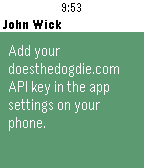
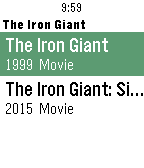
Built a PebbleOS watchapp backed by the crowd database at doesthedogdie.com so you can check emotional spoilers and content warnings for movies, TV shows, books, and games right from your wrist.

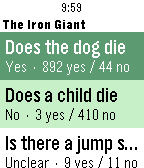
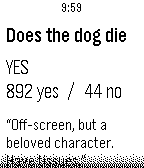
Home menu Voice search Search results Trigger list with verdicts Trigger detail view
  • Voice search: press Select and speak a title into the watch microphone
  • In theaters near me: uses phone GPS to find local cinemas and list today’s movies so you can check triggers before walking into a theater
  • Starred triggers: star the categories you care about most so they pin (★) to the top of every lookup with color-coded Yes/No/Unclear vote tallies and top comments

GitHub: https://github.com/BigWebstas/PebbleDoesTheDogDie

Forked WinNUT-Client (the Windows NUT client for monitoring a UPS attached to a Linux server) and released v3.0.0.0 to fix the biggest annoyance I had with it: giving up after a fixed number of reconnect attempts when a server reboots or network blips.

WinNUT-Client Icon
  • Made auto-reconnection perpetual on a configurable timer until the NUT server comes back online
  • Added a dedicated Reconnect Interval setting in the Connection preferences UI
  • Retargeted AGauge to .NET Framework 4.7.2, pointed the in-app updater at the fork’s releases, and added a GitHub Actions workflow to build the Windows MSI installer automatically

GitHub: https://github.com/BigWebstas/WinNUT-Client

Released v1.2.1 of Pebble Movie Times on GitHub.

Release Notes

Bug-fix release.

  • Showtimes were fetched for the wrong theater when favorites were pinned (the watch sent the post-sort row index instead of the wire index).
  • A timed-out or quota-blocked showtimes request cached the theater as “no showtimes” for the rest of the day. Now the empty result is only remembered after Google actually replies, and the background prefetch tries the same query shapes as a tap.

Downloads

Release page: https://github.com/BigWebstas/PebbleMovieTimes/releases/tag/v1.2.1
Repository: https://github.com/BigWebstas/PebbleMovieTimes

Released 1.61.31 of Goals Vision Board (SP) on GitHub.

Release Notes

Changes

  • The board now starts with a single page instead of two.
  • Add page and Remove page buttons appear in Edit mode (up to 8 pages).
  • Remove page asks to confirm and is blocked when only one page remains.
  • The page button cycles through all pages and shows Page X/N; it hides when there is only one page.
  • Existing two-page boards still open unchanged; saved pages are kept on load (capped at 8).

Install

Download goals-vision-board-v1.61.31.zip below, then in Super Productivity: Settings → Plugins → Upload plugin, pick the file, and enable it.

Do not use the green Code → Download ZIP button; that archive cannot be installed.

Downloads

Release page: https://github.com/BigWebstas/vision-board-super-productivity/releases/tag/1.61.31
Repository: https://github.com/BigWebstas/vision-board-super-productivity

Released v1.2.0 of Pebble Cardia on GitHub.

Release Notes

Launcher glance

Leaving the app now writes the latest heart-rate reading to Cardia’s launcher subtitle, e.g. 72 BPM · 4 sec ago. The age updates on its own while the app is closed and the line clears after 6 hours. An abnormal rhythm is named (128 BPM Elevated · …).

Also fixes the stale package.json version (was 1.0.0).

Install: download Cardia-1.2.0.pbw and pebble install --phone <ip> Cardia-1.2.0.pbw, or build from source.

Downloads

Release page: https://github.com/BigWebstas/PebbleCardia/releases/tag/v1.2.0
Repository: https://github.com/BigWebstas/PebbleCardia

Built PebbleUTA to check nearby Utah Transit Authority (UTA) bus and TRAX/FrontRunner rail departures and pinned favorite stops straight from my Pebble watch.

Because UTA’s realtime GTFS-RT feed identifies stops by trip sequence rather than stop ID (requiring a join against ~467,000 rows in stop_times.txt), I also built a self-hosted ASP.NET Core proxy service at uta.webstas.net that holds the GTFS schedule in memory and serves compact per-stop JSON responses to the watch.

PebbleUTA Departures Screenshot

GitHub: https://github.com/BigWebstas/PebbleUTA
Live GTFS Proxy: https://uta.webstas.net

Been heavily expanding Life180, a custom Home Assistant integration that puts a live family tracker map and location history analyzer right in the Home Assistant sidebar.

Life180 Icon
  • Live map of every Home Assistant person entity with person avatars in both the map markers and people table
  • Interactive crosshair auto-fit toggle and map search
  • Draw, move, resize, and color Home Assistant zones directly on the map
  • Historical position filter with automatic stop detection, per-zone time summaries, and export to CSV, XLSX, KML, or PDF
  • Updated automation blueprints (including modern telegram_bot.send_message chat_id support) for zone enter/leave and low battery alerts

GitHub: https://github.com/BigWebstas/Life180

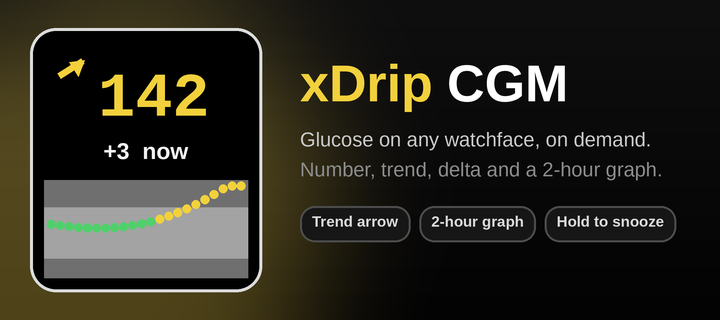
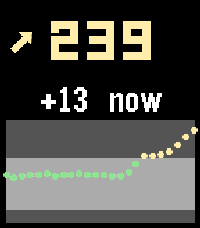
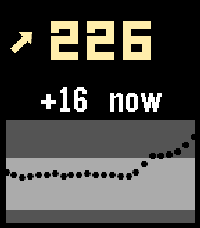
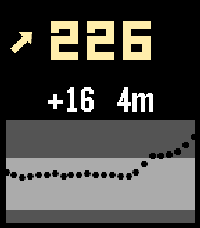
Sometimes I want to wear a non-CGM watchface without losing quick access to my blood glucose numbers, so I built PebbleXDrip—a Pebble quick-launch watchapp (not a watchface) for xDrip+.

Bind it to a Quick Launch button from any watchface, and it polls xDrip+’s local Nightscout endpoint (http://127.0.0.1:17580/sgv.json) to show your current mg/dL reading (color-coded by range), trend arrow, signed delta, and a 2-hour glucose graph.

PebbleXDrip Banner PebbleXDrip Watch Screen PebbleXDrip In-Range Graph PebbleXDrip High Reading

GitHub: https://github.com/BigWebstas/PebbleXDrip

Released v1.1.0 of Pebble NYT Top Stories on GitHub.

Release Notes

Smoother, cleaner list UI.

  • No more row-by-row pop-in. The loading screen holds until every story has arrived, then the list paints once. A 12s fallback shows a partial list if the stream stalls.
  • Smooth title marquee. The selected title glides one pixel at a time with a pause at the start so you can read it, and a pause each time it loops. Was a coarse multi-pixel jump.
  • Cleaner rows. Dimmed section label under the title, black masthead banner, centered loading text.
  • Cleaner detail view. Bold title, plain body, small dimmed byline.

Sideload PebbleTopNyTimes-v1.1.0.pbw for aplite, basalt, chalk, diorite, emery, and gabbro.

Downloads

Release page: https://github.com/BigWebstas/PebbleTopNyTimes/releases/tag/v1.1.0
Repository: https://github.com/BigWebstas/PebbleTopNyTimes